What used to take me 45 minutes for a single shipment now only takes 10 or 15 minutes.
Nancy McMullen
WinSystems
Shipping Solutions software gives U.S. exporters one place to create export documents, file Electronic Export Information through the Automated Export System (AES) and maintain shipment records. The Shipping Solutions Professional and Enterprise versions add ERP integration and export compliance tools, allowing you to use the same shipment data from order entry through final recordkeeping.
Whether you ship a few exports each month or manage exports across multiple users and locations, there is a Shipping Solutions version designed to fit your workflow.

What used to take me 45 minutes for a single shipment now only takes 10 or 15 minutes.
Nancy McMullen
WinSystems
I just love this program! It makes my job fast and efficient. Customers and freight forwarders love my paperwork.
Ana Zax
Diamon-Fusion International
Save even more time by uploading your company, contact and product information into the various Shipping Solutions databases. Now you can choose all your contacts and products from a drop-down list instead of manually typing the information every time you create a new export shipment.
Not only does this allow you to create your export documents faster, it ensures that everyone at your company is using the same names, addresses, descriptions and classifications. This is a key step in ensuring compliance.
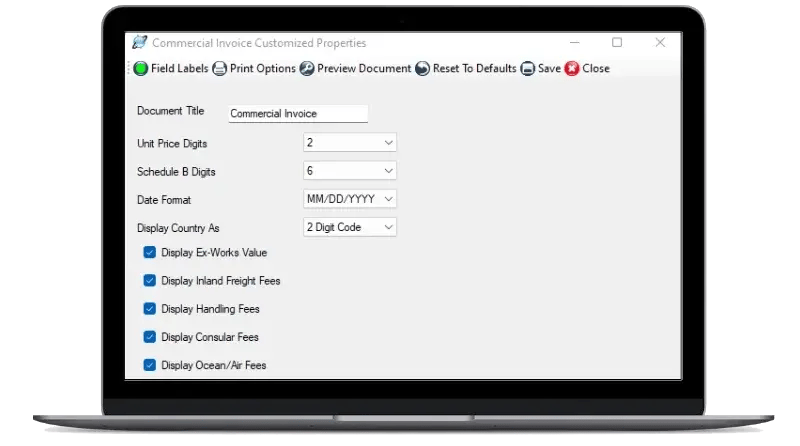
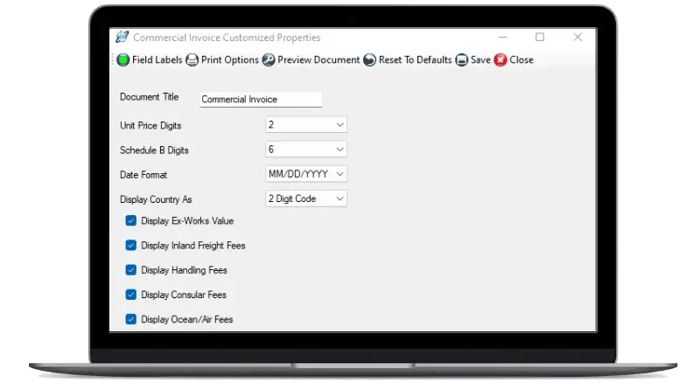
Many non-regulated forms can be adjusted to meet your company’s needs. Depending on the form, you can change titles and field labels, add company logos and stored signatures, select date and number formats, show or hide certain charges and adjust margins for company letterhead.
These options give you control over how your documents look without requiring employees to maintain separate Word or Excel templates.
The Professional and Enterprise versions include the IATA Dangerous Goods Database. Search by UN number or proper shipping name, select the appropriate entry and store information such as the UN number, proper shipping name, classification and packing group with the corresponding product. You can then use that information to prepare IATA and IMO Dangerous Goods Declarations.
While the Shipping Solutions software can help you create your dangerous goods forms, you’re still responsible for ensuring everyone is properly trained and correctly classifying, packaging, marking and labelling dangerous goods and complying with applicable regulations.
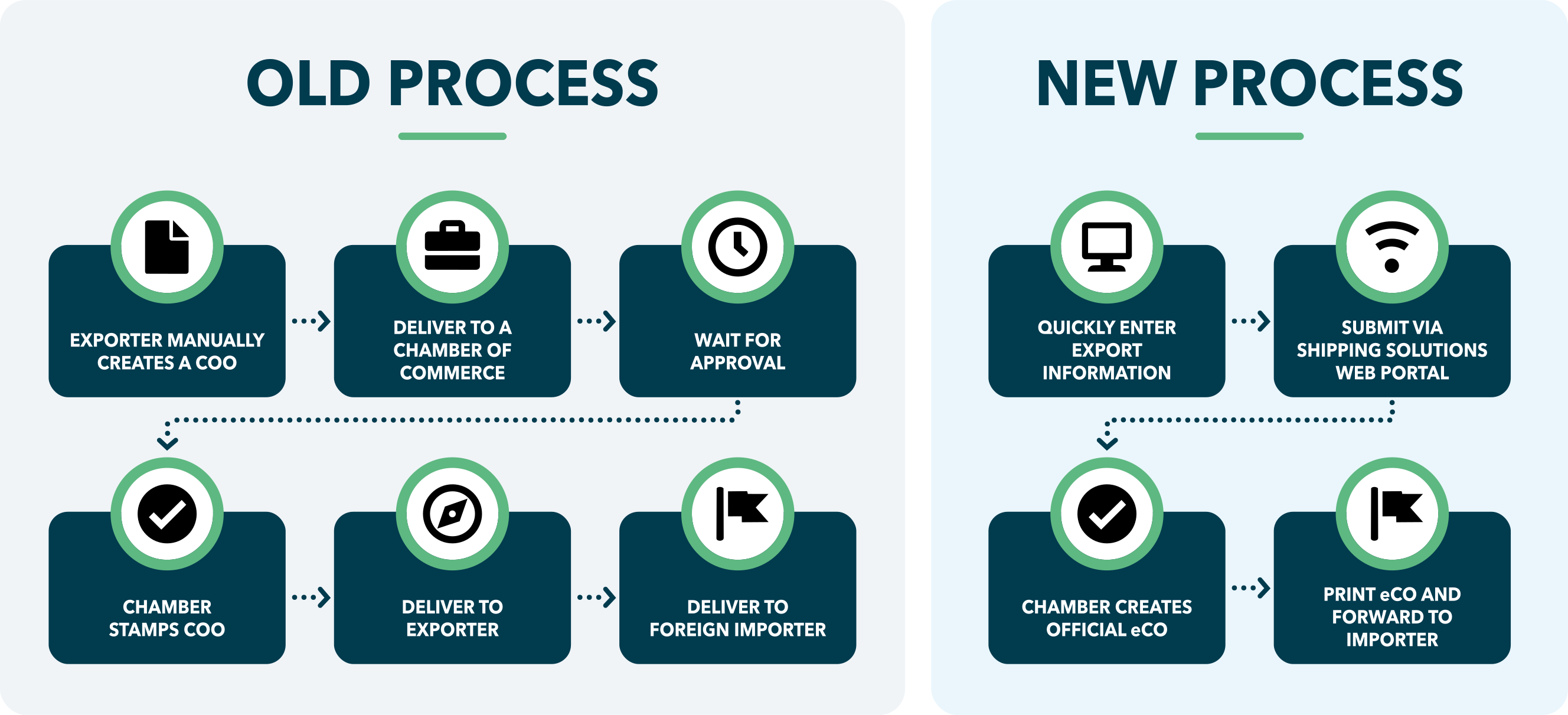
If your customer requires a Certificate of Origin certified by a Chamber of Commerce, you can print out a Certificate of Origin form from Shipping Solutions and take it to your local chamber for review and approval. Alternatively, you can submit your Certificate electronically to a Chamber right from the software, and they will provide you with an electronic version of the form typically on the same day.
Not only are electronic Certificates of Origin (eCO) usually faster to obtain, they are often less expensive than paper Certificates, especially if you factor in the time, cost and effort to get the paper form to and from the Chamber. eCOs are also registered with the International Chamber of Commerce, providing an additional level of security not available with paper forms.
Shipping Solutions Annual Maintenance Program subscribers receive discounted chamber certification pricing.
Shipping Solutions Professional and Enterprise versions include our Data Exchange Manager (DXM), which allows you to import orders from your existing business system using delimited text files, an XML file or an ODBC connection. Shipping Solutions customers have connected the software with large ERP platforms, custom manufacturing systems and smaller accounting packages.
You can automate the integration on a schedule to regularly import new orders into the Shipping Solutions software, or you can manually trigger the integration to occur when requested by a user. By using the information that is already in your business system, you reduce rekeying, typographical errors and the need to maintain duplicate customer and product databases.
When the U.S. Foreign Trade Regulations require you to file your Electronic Export Information through AES, Shipping Solutions uses the same information you entered to create your export documents to prepare the filing. The software guides you through the required AES data and allows you to submit it directly to the ACE portal.
By filing directly from Shipping Solutions, you don’t need to reenter all your shipment information on the ACE platform or send it to someone else to re-key. You can review your information before you submit it and then capture and store the Internal Transaction Number (ITN) as part of your shipment record, so you have proof of filing.
If you aren’t doing the AES filing yourself, the Shipping Solutions software uses your existing shipment information to generate an SLI with all the required export information to give to the authorized filer.
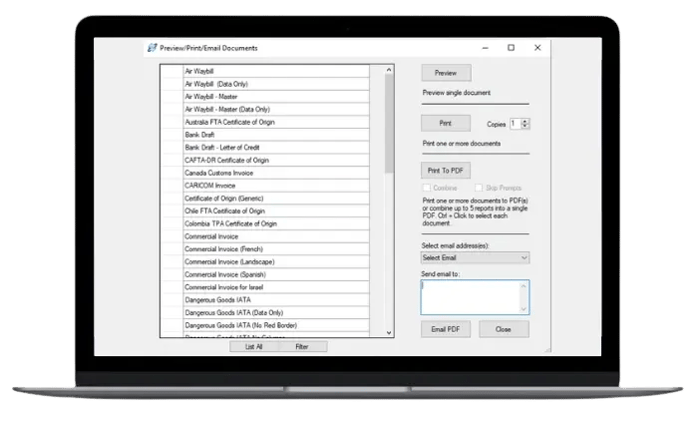
Once your forms are ready, print them, save them as PDFs or email them directly from Shipping Solutions to customers, freight forwarders and other parties that need them.
Shipping Solutions also retains the shipment records you create. You can find and reprint previous documents, copy an earlier shipment into a new record and change only what is different. Standard reports help you review exports by customer, country, freight forwarder or other criteria. You can also create custom reports and export the results to Excel.
The Export Compliance Module automatically stores the date, parties and results for screenings in an Audit Trail, so you have proof that your company is doing its due diligence if you ever get audited by the Office of Export Enforcement, the FBI or some other agency that has jurisdiction over your exports.
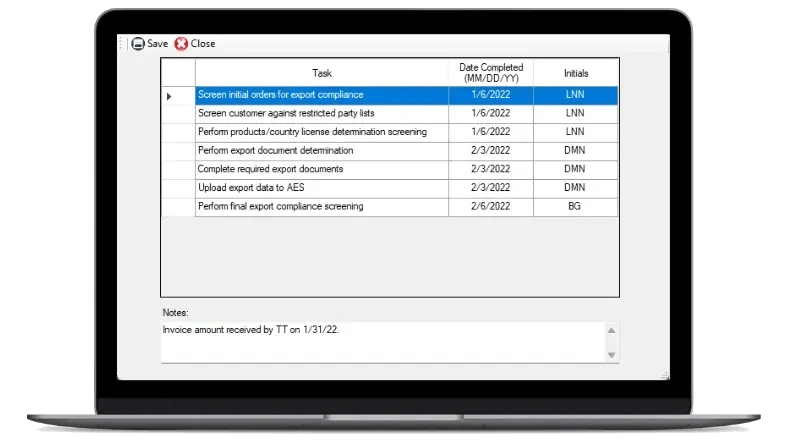
In addition, the Shipment Log allows Professional and Enterprise users to identify the key steps in their company’s export procedures and record who completed each step and when. Together, these tools will help you demonstrate that you completed the required steps and procedures for your shipments.
The Professional and Enterprise versions allow administrators to create user groups and assign different access rights. You can require individual logins, control which functions each group can use and allow designated users to lock completed shipment records, so they are not unintentionally changed after the documents have been finalized.

Shipping Solutions Classic is designed for companies that need a faster, more accurate way to create standard export forms, store frequently used information and file through AES.

Shipping Solutions Professional includes everything in Classic along with ERP integration, dangerous goods tools, the Export Compliance Module, additional forms and administrative controls. It is the best fit for exporters that want to connect documentation, AES filing and compliance tasks in one workflow.

Shipping Solutions Enterprise includes all Professional features, unlimited user licenses and a secure cloud-based SQL database managed by Shipping Solutions. It is designed for companies with many employees or multiple locations involved in exporting.
Every exporter works a little differently. Schedule a personalized demonstration to see how the Shipping Solutions software can help your company more efficiently create accurate export documents, file through AES, manage export recordkeeping requirements—and, with the Professional or Enterprise versions, stay compliant with U.S. export regulations.



I have about 272 team members using Shipping Solutions, mostly in the U.S., but also at a plant in Mexico, [and I] have visualization of every shipment that goes out of every location… The system is very easy to use. Our employees love using it. It makes life a lot easier for a lot of us.
Sandy Schultz
Quad
Shipping Solutions has been the best thing to happen to our exporting program. We are able to store unique customer data in a uniform way. No more trying to remember how to fill out every carrier's forms. No more entering and reentering information into multiple locations. Enter it once and be done. The restricted party screening is a great tool. One click and you're done. Shipping Solutions has saved us time, money and aggravation. I would recommend Shipping Solutions to anyone who exports.
Carol L. Wilson
Frontline
We are a small, but rapidly expanding company. Without Shipping Solutions Professional, we'd be lost in a sea of export orders. It helps us process and track our orders so quickly and efficiently, we don't want to be without it! Before we tried to do it all by hand, which cost us a lot of time and errors. Thanks for creating such an essential product!
Dacia Lindner
Diamon - Fusion International
Restricted party screening and filing through AES are my two favorite Shipping Solutions features!
Carol Bubbico
Cornelis Networks
Shipping Solutions is an excellent software package especially for the smaller exporter. The software is user friendly and easily adapted to individual company requirements. The online User Guide is easy to use with step-by-step illustrations of each screen. The Annual Maintenance Program provides users with the latest updates as they become available. The Customer Service Support Team is very responsive in addressing any technical questions.
Leah Kieffer
Brooks Instrument
We purchased your Shipping Solutions and are extremely happy with its capabilities. It's fast and easy to use.
Linda J. Weller
Production Control Units, Inc.
.webp?width=700&height=424&name=Store-and-reuse-customer-product-information%20(1).webp)


.webp?width=600&height=415&name=DXM%20Time-Saving%20Software%20Connectivity%20(1).webp)